Yes, this is free to use. You can access a new version of the TI-84 directly in your browser without the need to download or install any software.For simpler needs, you can use our TI-30XS Calculator Online.
As a student, you often rely on your TI-84 calculator to help with math assignments and exams. But sometimes, carrying that bulky device around can be difficult. Additionally, it can be expensive, costing anywhere from $100-$130. But there is an easier and more economical way to access all the features of this calculator, that is the TI-84 online calculator.For basic scientific calculations, you can also try our TI-30XS Calculator Online.
This web-based calculator offers all the same functions as the physical version, but it’s free and easy to use from your browser. No downloads, no installations, and no heavy device to carry around. You just need quick and reliable access whenever you need it. Later, you’ll learn how to access this tool and solve all your math tasks, no matter where you are: at school, home, or travelling.
The TI 84 calculator is a free, browser-based calculator of the famous TI-84 Graphing Calculator by Texas Instruments. It offers the same features as the physical version, which allows users to solve algebraic expressions, graph functions, and work through calculus problems, all without needing a physical device. This online version provides an easy, accessible way for students, teachers, and professionals to handle their math tasks easily.
Its compatibility with both mobile and desktop browsers makes this calculator even more convenient. You don’t need to download or install; just access the tool directly from your browser. No matter whether you’re in a classroom, studying at home, or on the go, it gives you the essential math tools you need for everything from basic equations to complex graphs.If you mainly need graph visualization, this tool works similarly to our Graphing Calculator Online.
There are two main options to access this calculator online:
By following the given steps, you can easily use this calculator online for all your math problems.
If you prefer to use the calculator without an internet connection, you can download the TI-84 Plus Graphing Calculator emulator for your device. This emulator is available for various platforms, allowing you to access the TI-84’s features offline. In this way, you can use the calculator offline or have access to it on multiple devices, Windows, Mac, iOS, Android, and Linux from our website as well.
The TI-84 Plus CE is equipped with several useful features that help users solve complex math problems:
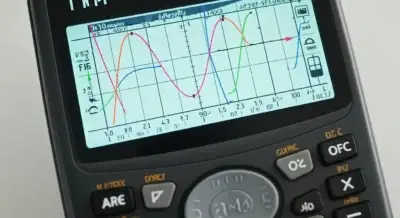
It makes it easy to graph mathematical functions. You can quickly draw graphs for equations like lines, curves, and polynomials. The calculator shows you essential points on the graph, like where it crosses the x-axis or y-axis, as well as the highest or lowest points of the graph. You can also zoom in or out to get a closer look.
It helps you solve many types of math problems. It can solve simple problems, like adding and subtracting, as well as more advanced problems in algebra, calculus, and trigonometry. You can use it to solve equations, find derivatives, slopes of curves, and integrate. It also works with things like complex numbers and matrices.
It also has statistical tools to help you work with data. You can find the mean, median, mode, and standard deviation. It also helps you make charts, like histograms and scatter plots, to visualize your data. You don’t need to install anything to use it; you can just open it in your web browser.
One of the best things about the TI-84 online calculator is that it’s completely free. Unlike the physical TI 84 calculators, which can cost between $100 and $130, the online version costs nothing to use. This is perfect for students, teachers, or anyone who needs a reliable calculator without spending money.Smart84Calc provides free online calculator tools for students and professionals.
You don’t need to download or install any software to use this calculator. You just need to open your browser and start using it. There is no need to wait, no complicated setup. This makes it very easy to get started, and it saves space on your device since there’s no heavy software to store. You can use it on any device, like your phone, tablet, or computer.
It can be used on any device with an internet connection. You don’t need to carry around a physical calculator anymore. Whether you’re at home, in the classroom, or on the go, you can access it anytime as long as you have internet access. This makes it very convenient for students, professionals, and anyone who needs quick access to a calculator.
If you need to solve a problem quickly, it provides you with a quick solution. It gives you access to all its features without needing to set anything up. When you’re solving math problems for class, analyzing data, or graphing equations, you can get your answers fast. This is especially useful when you’re in study sessions or exams.

The TI-84 online calculator operates just like the physical model. You can solve algebra, precalculus, statistics, and calculus problems in the same way. However, there are a few limitations to the online version. APPS like Python, Periodic Table, or Simultaneous Equation Solvers are not available on the online TI-84.
If you don’t need any coding or extra features, this free online calculator will be perfect. For simpler calculations, our TI-30XS Calculator Online is also a great option. Just click on the start button and solve your math problems quickly.
The TI 84 Calculator and TI 84 Plus CE Calculator are both made by Texas Instruments, known for their quality graphing calculators. Here’s a comparison of both calculators.
Feature | TI-84 Calculator | TI-84 Plus CE Calculator |
Display | Monochrome, 160×240 pixels | Colour, 320×240 pixels |
Design | Bulkier, heavier | Slimmer, lighter, more portable |
Battery | 4 AA Batteries | Rechargeable Lithium-ion battery (USB charging) |
Processor Speed | Standard speed | Faster processing and more memory |
Graphing Capabilities | Standard graphing functions | Enhanced graphing with colour and higher resolution |
Memory | Limited storage | Larger storage can store more apps & data |
Price | More affordable | Higher price due to advanced features |
Additional Features | Basic graphing and math functions | 3D graphing, TI-Nspire app compatibility |
The TI-84 online calculator offers many of the same functionalities as the physical device, including:
However, some features like TI-BASIC programming or specific apps are not available on the online TI-84. Additionally, the TI-84 Plus CE Calculator may experience slower performance compared to the physical version, and internet access is required for use.
Here are some key specifications of the TI-84 hardware:
Connectivity: USB port for computer and unit-to-unit communication
Here’s how the online TI-84 compares to the physical TI-84:
Feature | Online TI 84 Calculator | Physical TI 84 Calculator |
Accessibility | Accessible via browser | Requires a physical device |
Cost | Free | Costs $100-$130 |
Portability | Depends on the internet connection | Portable without internet |
Functionality | Lacks advanced features like programming | Offers full features, including programming |
Test Compliance | Not allowed in testing centres | Approved for standardized tests |
The TI-84 calculator simulator online is one of the best tools for solving complex math problems. But there are several other free graphing calculators that also stand out. Here are some of the best alternatives to the Texas Instruments calculator:
Desmos is very easy to use and best for beginners. It allows you to graph equations and explore different mathematical functions. You can create tables and see the graphs update in real-time. You can also log in to save your graphs and access them later from any device.
It is a versatile tool that offers more than just graphing. It allows you to solve equations and create interactive math simulations. You can work with algebra, geometry, and calculus all in one calculator. It also provides a community of users who share their work and ideas.
This is an impressive tool that not only graphs equations but also explains complex math problems. It’s like a virtual tutor that guides you through solving math questions. You can enter any math problem, from introductory algebra to advanced calculus, and it will give you a solution.
Symbolab is famous for its step-by-step approach to solving math problems. It can help you with algebra and calculus. You can graph equations and get detailed solutions that show every step. This makes it easier to learn and understand the steps involved in solving problems. Symbolab also provides tips for improving your math skills.
It is a quick and easy tool for solving math problems. It allows you to graph equations and shows step-by-step solutions. The interface is easy, which makes it perfect for students. You can easily enter your math problems, and Cymath will help you solve them quickly.
To use this Calculator and get the best results, make sure to follow these helpful tips and tricks:
Yes, this is free to use. You can access a new version of the TI-84 directly in your browser without the need to download or install any software.For simpler needs, you can use our TI-30XS Calculator Online.
The TI-84 calculator online is a free tool that you can easily use for all your math problems. We’ve shown you how to access it directly through your browser, without needing to download, and even how to use the emulator for offline access. It’s perfect for students, teachers, and anyone who needs a quick, easy way to solve math tasks. For basic and lightweight calculations, you can also use our TI-30XS Calculator Online, while equation visualization is available through the Graphing Calculator Online.
By using this simple code, you can embed the tool on your site:
<iframe src=”https://yourcalculatorlink.com” width=”600″ height=”800″ frameborder=”0″ allow=”fullscreen”></iframe>